Listen Patch
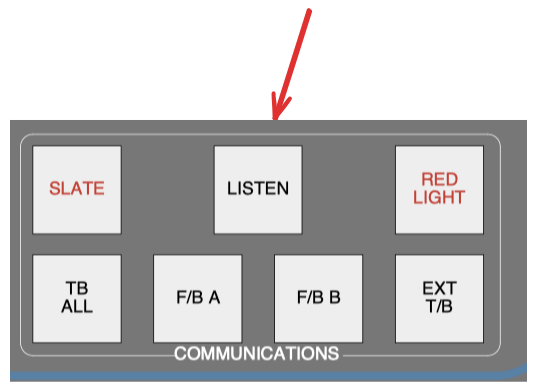
We need the listen patch to more effectively hear what's going in the tracking room. When we're first setting up, it allows those in the control room to immediately hear what's going on in the tracking room. There are also situations in which a microphone isn't close to a particular member of the band who seeks to communicate with us, and the listen microphone can help us hear them.
When activating the listen button, sound originates from within the studio. You can select which sound source to plug in to, which typically makes the most sense being a microphone in the tracking room near the musicians. Conveniently, there are always microphones connected in that room, even if you haven't noticed them. Look up to the ceiling for a microphone and note its MIC line number.
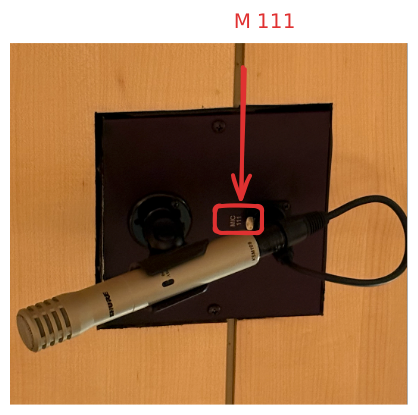
MIC line 111 is a good choice because it is in the center of the tracking room.
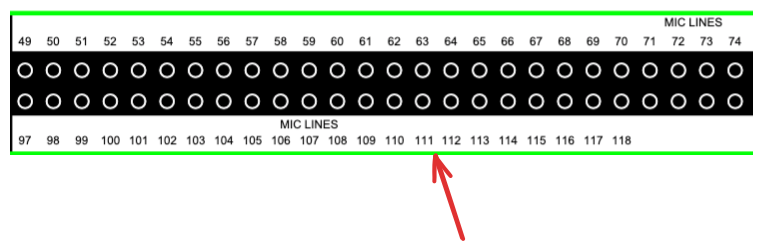
Trace the signal to the LSTN patch on the console to establish a connection, using tie lines if needed (as would be the case if continuing off the example above).
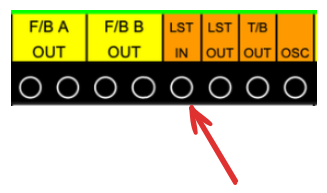
[!NOTE] ⚠️⚠️⚠️ WARNING!!! ⚠️⚠️⚠️ Make sure the LSTN button is off while patching to prevent the existing phantom power in the LSTN patch point from being heard.
In the future, phantom power won't be present in this patch point. Until then, be careful to avoid shifting the patch point to the LSTN point, as it can cause loud noise bursts.
[!NOTE] ⚠️⚠️⚠️ WARNING!!! ⚠️⚠️⚠️ Lowering or cutting the console volume won't reduce the listen volume; only turning off the listen patch will stop it.
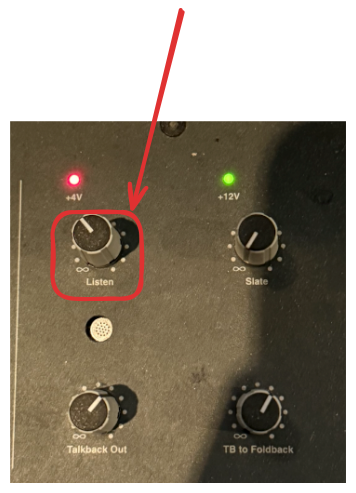
Controlling Level of Listen Mic
Quiz Questions
- Where should you source the LSTN patch?
- After locating the microphone for the LSTN patch, how should you ultimately connect it?
- What should you ensure before patching into or out of the LSTN patch?
- Why should you be cautious while moving the patch point into the LSTN point?
- Will dimming or cutting the console reduce the noise caused by the LSTN patch?
- What will change in the future regarding phantom power in the LSTN patch point?
Quiz Answers
- Look at the ceiling in the tracking room for a microphone and observe its MIC line number.
- To the LSTN patch on the console, using tie lines to console if necessary.
- That the LSTN button is disengaged to avoid hearing a loud pop as a result of the phantom power running through the patch point
- It can create loud bursts of noise if not handled carefully.
- No, only turning off the listen patch will be effective in reducing noise.
- Phantom power will be absent from this patch point.