ProTools Groups
Updated 7/20/2026
Groups in ProTools can be a great way to perform edit actions on multiple tracks at the same time. To use groups, you can access the group icon in ProTools by pressing command G.
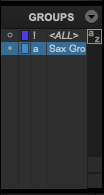
These allow you to perform the same actions across multiple tracks, such as changing levels, record enabling etc. These are different from 03. 2 Folder Tracks in that they don't affect routing.
Link to Youtube Video on the subject: https://www.youtube.com/watch?v=Bnfcn_X4OyA