Making a Beat with Midi Drum Samples Using Boom
Instead of manually dragging audio into the timeline for every drum hit, you can use MIDI to trigger the drums. This allows you to either program the entire drum pattern or control individual drum hits, streamlining the process and giving you more flexibility in editing.
Triggering Entire Patterns with MIDI Events
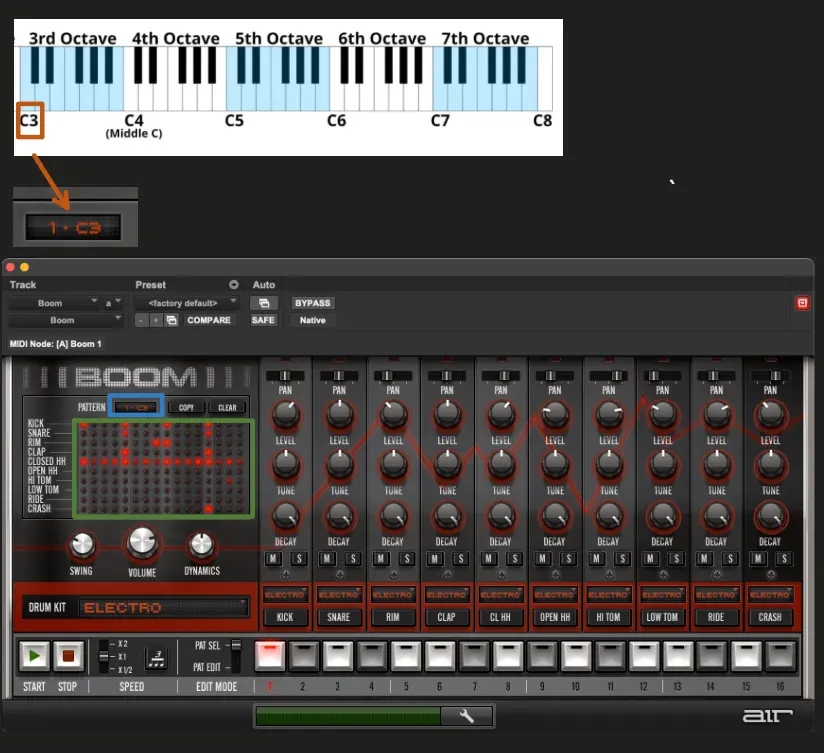
A single MIDI event can trigger an entire drum pattern, streamlining your workflow. In the Boom instrument, a specific note on the MIDI keyboard, such as "C3," is mapped to trigger a complete pattern. You'll notice this in the interface, where "C3" aligns with the drum pattern highlighted in green. This allows you to program the entire pattern within Boom, eliminating the need to manually drag samples onto the timeline at specific time intervals, making the process much more efficient. This works when selecting notes
Triggering Individual Drum Hits with MIDI Events
Alternatively, you can trigger individual drum hits by selecting notes in the lower octaves. This method allows you to control the pattern directly as a MIDI clip on the timeline, rather than relying on Boom's plugin interface to manage the pattern.