Collecting Sounds with Field Recorder
Find Interesting Sounds
The first step is to find interesting sounds. The closer you are to a source, the more of that sound you'll get in relation to the background noise.
If you have a windscreen or a pop filter, or a specific mic in mind, you can isolate the sound sources better.
Importing Audio Files to Computer
Either conenct the field recorder to the computer via USB C or take out the microSD card and place it into the SD Card reader adapter and plug it into the Mac Studio.
Copy the files to a logical place on the computer. Return the SD card back to the field recorder.
32 Bit ProTools Session
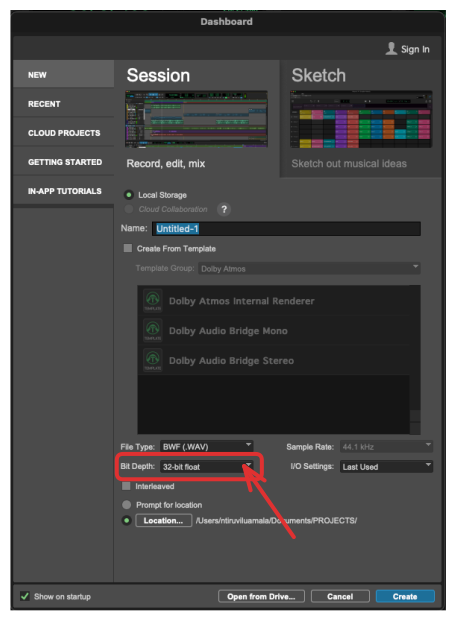
Since the Zoom H6n that we have utilize 32 bit for recording, we'll want a 32 bit ProTools ession sto allow us more robustness when wroking on our projects.
Import Samples into ProTools
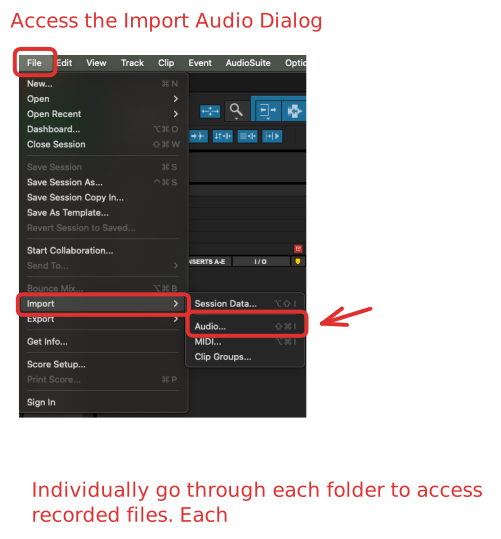
Make sure you use the import dialog within ProTools.