SSL Duality Channel Strip Compressor
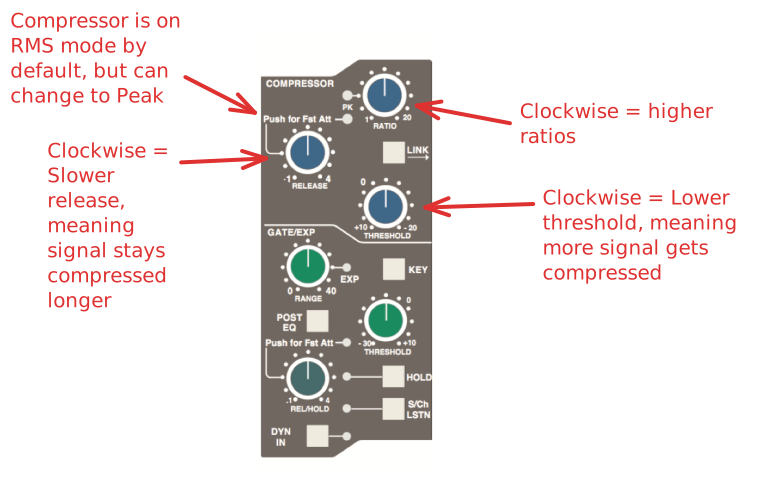
The Dynamics Section
The Dynamics section contains a compressor section identical to that of the 9000 K Series and also found in SSL's X-Logic range of outboard processing units. In normal use, the compressor’s true RMS side chain and over-easy soft ratio function provide a very transparent compression action even with large amounts of gain reduction. The fast attack option offers the classic SSL compressor sound normally associated with its use on drum and percussion sources. Selecting Peak (PK) mode defeats the over-easy soft ratio, modifies the release curve and attack times, and unleashes a far more aggressive sounding compressor ideal for more radical sonic shaping.
The Gate/Expander section is a new variant of SSL’s classic 4000 series three-control design. It features the choice of a steep gate or gentle expander slope, with optional fast attack. The new ‘Hold’ (HOLD) option flips the variable release (REL) control to function as a variable hold-off time with a fixed release curve.
The complete section is switched in or out of circuit using the DYN IN button (see also Central Routing Control). When the dynamics section is in circuit, the DYN box on the channel TFT display is highlighted.
Individual controls act as follows:
Compressor
RATIO
When turned to 1:1, the compressor section is inactive. Turning the control clockwise increases the compression ratio until it reaches a true limit mode at the fully clockwise position. Pressing the RATIO knob switches the compressor to peak mode, and replaces the ’over easy’ characteristic with a hard knee, providing an alternative voicing for some instruments. The PK LED lights to indicate that this option has been selected.
THRESHOLD
Whenever a signal exceeds the level set by this control, the compressor will start to act at the ratio set by the RATIO control. This control, in conjunction with the Ratio setting, provides automatic make-up gain, so as you lower the threshold and introduce more compression, the output level is increased, maintaining a consistent output level.
RELEASE
Sets the time constant (speed) with which the compressor returns to normal gain settings once the signal has fallen below the compressor threshold. This control also incorporates a push-push switch which selects a very fast attack time as an alternative to the standard time constant.
Additional Dynamics Controls
The LINK button in the compressor section links the sidechain signal of that unit to the sidechain of the next dynamics section to the right. When two dynamics sections are linked, the control voltages of each section sum together, so that whichever section has the most gain reduction will control the other section.
Note: Don’t try to link two gates using the LINK button when you want the signal on one to open the other. If you need to achieve this effect, take a keying signal from one section to trigger the other. The easiest way to do this is by patching from the insert send of the ‘source’ channel into the Key input (see below) of the ‘destination’ channel, and selecting the KEY button on this channel.
The KEY button feeds whatever signal is present on a channel’s Key input (D-connector) into the sidechain input of that channel’s dynamics section. Pressing S/CH LSTN routes the sidechain signal to the console’s PFL bus. This simplifies the set up when either an external key input or the filters to side chain option is in use.
POST EQ (not surprisingly) places the dynamics section post the EQ section (see also Central Dynamics Controlbelow).
When the dynamics section is not in circuit, its sidechain input is also bypassed.
Signal processing order is graphically displayed on the channel TFT screen
Central Dynamics Control
The centre section master routing panel replicates the dynamics POST EQ function for sweet spot control and multiple channel operation using the SELECT/TO range keys.
Dynamics Section Metering
The TFT screen above each bay of six channel strips is used to display a wide variety of relevant information. In its default Channel mode, as well as channel output metering (see later) a display of dynamics section gain processing is shown, in the form of two columns of indicators — yellow and red for the compressor, green for the gate/expander. See Channel Metering for more information.
Channel Metering
A single peak meter indicates either analogue channel signals or DAW levels, according to selection of the Console/DAW ‘Focus’ button (see Section 3 for more on this). The standard scale is +24dB for 0dBFS (top of the scale). Other reference levels (+18dBu, +20dBu, +22dBu) can be selected in the SSL / MISC / SETUP menu. A peak hold option is available for channel and centre section meters via the centre section Meters setup menu. A legend below the Dynamics section indicators (see below) confirms the currently selected meter point for that channel, as set on the central routing.
In addition to the expected channel metering, two columns of five ‘LEDs’ give an indication of channel gate/expander gain reduction (green ‘LEDs’) and compressor gain reduction (yellow and red ‘LEDs’).