Troubleshooting Playback - The ProTools Playback Engine
What is an Audio Interface
An audio interface is a device that connects external audio sources to your computer. It typically includes both audio input and output components. While every consumer computer comes with a basic built-in audio interface, allowing you to use the computer’s microphone and speakers for input and output, an external audio interface offers superior sound quality and additional features. Configuring your playback engine in your audio software determines which audio interface you use, providing greater flexibility and control over your audio setup.
The Importance of Configuring the ProTools Playback Engine
ProTools needs to interface with the outside world in order to send and receive sound. 90 percent of the problems in ProTools can be attributed to having the wrong playback engine selected.
Accessing the Menu Option
First, we need to access the correct menu option. We can adjust the Playback Engine in the "Setup" menu.
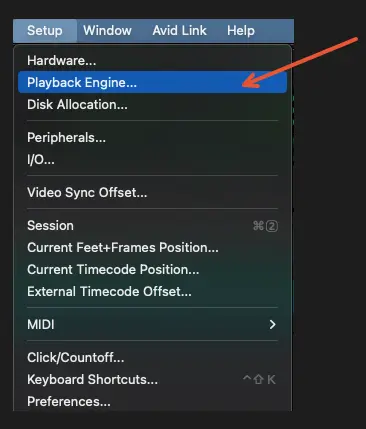
Setting the correct playback engine
The playback engine that we select will often depend on what interface we are using.
Using ProTools on a Classroom Machine at Southwestern College
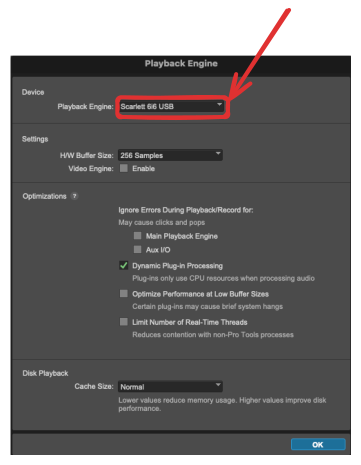
When using ProTools on a classroom computer at Southwestern College, select the Scarlett 6i6 as the playback engine. This red device functions as the audio interface, or enhanced sound card, for classroom use.
Using ProTools on your Laptop
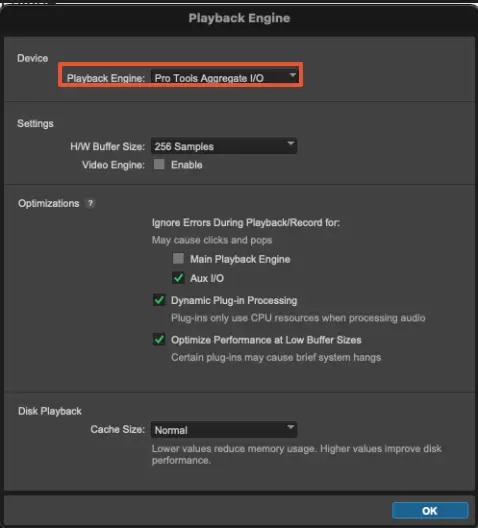
If we are trying to play sound through our laptop speakers, the default playback engine "ProTools Aggregate I/O" should work just fine.
Curated Resource
Watch this external video resource on setting the correct playback engine: